
Best Value Available! 2025 Realistic Verified Free NCP-US-6.10 Exam Questions
Pass Your Exam Easily! NCP-US-6.10 Real Question Answers Updated
NEW QUESTION # 22
An administrator is setting a Windows client to access a Volume Group (VG) served by a Nutanix cluster.
Which configuration items should the administrator take from the cluster? (Choose two.)
- A. The cluster's fully qualified domain name (FQDN)
- B. The IPs of all cluster CVMs IP
- C. The cluster's data services IP (DSIP)
- D. The VG name
Answer: C,D
Explanation:
When setting up a Windows client to access aVolume Group (VG)via iSCSI, the administrator must configure the client's iSCSI initiator to connect to the correcttarget.
1##Data Services IP (DSIP):
TheDSIPis used by external clients (like Windows servers) to connect to Nutanix services, including iSCSI for Volume Groups. It's a highly available IP that floats across the cluster CVMs.
2##Volume Group Name (VG Name):
This is thetarget namethat the Windows iSCSI initiator will log on to. It's needed to identify which Volume Group to access.
The cluster's FQDN or all CVM IPs aren't used for direct iSCSI target connections. TheDSIPensures proper load balancing and failover for the connection, while theVG nameis essential to identify the specific storage being requested.
NEW QUESTION # 23
Question:
Which two minimum permission roles must a non-admin user have to enable Nutanix Objects? (Choose two.)
- A. Category Admin
- B. Cluster Admin
- C. User Admin
- D. Files Admin
Answer: B,C
Explanation:
Toenable Nutanix Objects(deploy a new Objects instance and manage bucket creation), a non-admin user must have the following minimum permissions:
Cluster Admin:
* Grants full cluster-level privileges, including resource provisioning, configuration, and management.
* Required to deploy services like Objects because it interacts with cluster resources directly.
User Admin:
* Allows user management and security roles necessary for configuring access to Objects.
* Critical when setting up Object Stores and managing authentication.
According to the NUSA course:
"A non-admin user must have at least the Cluster Admin role and the User Admin role to enable and manage Nutanix Objects deployments. Cluster Admin manages resources, and User Admin manages user-level permissions." The other roles:
Files Admin- manages Nutanix Files only.
Category Admin- relates to category/tag management in Prism, not Objects deployment.
Thus, toenable Nutanix Objects, the user needsCluster AdminandUser Adminpermissions.
NEW QUESTION # 24
An administrator has a primary Nutanix Files instance running on an ESXi-based Nutanix cluster. An identical Files instance has been configured at a secondary site for disaster recovery purposes with less than
5ms latency between sites.
Management has asked that the primary Files instance be configured in such a way that provides a zero RPO.
Which File Server option needs to be enabled to support the request?
- A. vSphere Cluster Services
- B. Metro Protection Domain
- C. Metro Protection Policy
- D. vSphere Cluster Availability
Answer: B
Explanation:
The Nutanix Unified Storage Administration (NUSA) course, in the module "Configuring Metro Availability for Nutanix Files," specifies that for zero RPO between two Nutanix Files instances, aMetro Protection Domain (Metro PD)must be enabled. This synchronous replication method ensures zero data loss (RPO = 0) and near-instantaneous failover capability between two sites with low latency.
The course states:
"For Nutanix Files running on two clusters with <5ms latency, Metro Protection Domains enable synchronous replication of Files data, ensuring zero RPO in the event of a failure." Reference:
Nutanix Unified Storage Administration (NUSA) course - Module: Configuring Metro Availability for Nutanix Files.
Nutanix Unified Storage (NCP-US) Study Guide - Topic: Zero RPO with Metro Protection Domains.
NEW QUESTION # 25
Question:
An administrator is preparing to deploy Nutanix Objects on an AHV-based Nutanix cluster in a multi-cluster environment. The Virtual IP address and Data Services IP address have already been configured on the AHV cluster.
Which additional IP address should be configured for successful Objects deployment?
- A. IPv6 address of Prism Element on AHV cluster
- B. Fallback Virtual IP on cluster where Prism Central is deployed
- C. Data Services IP on cluster where Prism Central is deployed
- D. Fallback Virtual IP of Prism Element on AHV cluster
Answer: B
Explanation:
When deploying Nutanix Objects in amulti-cluster environment, Prism Central coordinates deployment across clusters.
In the NUSA deployment module, it's emphasized:
"Prism Central requires a Fallback Virtual IP (VIP) on the cluster it manages to ensure management traffic can be redirected even if a CVM or Prism Element service fails." Thus, theFallback Virtual IP on the cluster where Prism Central is deployedis a critical additional IP address for:
Ensuring management continuity
Supporting Object service deployment across clusters
The other options (like IPv6 or DSIP on Prism Central's cluster) are not required specifically for Nutanix Objects deployment.
NEW QUESTION # 26
A company is managing two Nutanix clusters between two different availability zones: one on-prem and one running in the public cloud (NC2). The company is evaluating Nutanix Files and is looking for a solution that supports: 15-minute RPO or less, guided DR process, and minimal operations at failover time. Which data protection strategy should be considered?
- A. Smart Sync
- B. Smart DR
- C. Cloud Connect
- D. Protection Domain
Answer: B
Explanation:
To meet the requirements of a15-minute RPO (Recovery Point Objective) or less, aguided DR (Disaster Recovery) process, andminimal operations at failover timefor Nutanix Files across two Nutanix clusters (on-prem and in the public cloud via NC2), the company should considerSmart DR. Smart DR is a disaster recovery feature specifically designed for Nutanix Files, enabling replication of file shares between primary and recovery sites with low RPOs, guided failover processes, and automated recovery workflows.
TheNutanix Unified Storage Administration (NUSA)course states, "Smart DR for Nutanix Files supports replication with an RPO as low as 15 minutes, provides a guided disaster recovery process through Prism Central, and minimizes operations at failover by automating client redirection and share activation." Smart DR uses asynchronous replication to copy file share data to the recovery site, allowing for a 15-minute RPO by scheduling replication at 15-minute intervals. The guided DR process is facilitated through Prism Central's UI, which provides step-by-step workflows for failover and failback. Additionally, Smart DR automates client redirection by leveraging AD and DNS updates, minimizing manual operations during failover.
TheNutanix Certified Professional - Unified Storage (NCP-US)study guide further elaborates that "Smart DR is ideal for Nutanix Files deployments across availability zones, such as on-prem and NC2, supporting RPOs as low as 15 minutes, guided recovery workflows, and automated failover with minimal operational overhead." This makes Smart DR the best match for the company's requirements, as it addresses all three criteria effectively.
The other options are incorrect:
* Protection Domain: Protection Domains are used for VM-level replication and disaster recovery in Nutanix, not for Nutanix Files. They also typically have higher RPOs (e.g., 1 hour) and are not designed for file share recovery.
* Smart Sync: Smart Sync is not a Nutanix feature; it may refer to third-party tools or unrelated functionalities and is not applicable here.
* Cloud Connect: Cloud Connect is a feature for backing up or replicating data to public cloud providers, but it is not specific to Nutanix Files and does not support a 15-minute RPO or guided DR processes for file shares.
The NUSA course documentation highlights that "Smart DR is the recommended data protection strategy for Nutanix Files in multi-site environments, offering low RPOs, guided DR workflows, and automated failover to minimize downtime and operational complexity." References:
Nutanix Unified Storage Administration (NUSA) Course, Section on Nutanix Files: "Smart DR for disaster recovery across availability zones." Nutanix Certified Professional - Unified Storage (NCP-US) Study Guide, Topic 2: Configure and Utilize Nutanix Unified Storage, Subtopic: "Smart DR capabilities for Nutanix Files." Nutanix Documentation (https://www.nutanix.com), Nutanix Files Administration Guide: "Smart DR setup for multi-site file share protection."
NEW QUESTION # 27
An administrator has configured two object store instances, one in New York and the other in London. Both object stores are managed by their own Prism Central instances running compatible versions. Availability zone pairing and IAM replication has been configured between Prism Central instances; the implementation requires a common namespace. Which action should the administrator take next?
- A. Create a File System Namespace
- B. Create a Global Namespace
- C. Create a Kubernetes Namespace
- D. Create a Federated Namespace
Answer: B
Explanation:
To meet the requirement of acommon namespacefor two Nutanix Objects instances located in New York and London, managed by separate Prism Central instances with availability zone pairing and IAM replication, the administrator shouldcreate a Global Namespace. A global namespace in Nutanix Objects allows multiple object store instances to share a unified namespace, enabling consistent access to buckets and objects across geographically distributed sites using a single naming convention.
TheNutanix Unified Storage Administration (NUSA)course explains that "Nutanix Objects supports a global namespace to provide a unified view of buckets across multiple object store instances, which is critical for distributed environments requiring consistent data access." This feature ensures that applications and users can access objects using the same bucket names and paths, regardless of the physical location of the object store (e.g., New York or London). The global namespace is particularly useful in scenarios involving availability zone pairing, where data consistency and accessibility across regions are required.
TheNutanix Certified Professional - Unified Storage (NCP-US)study guide further details that "enabling a global namespace in Nutanix Objects requires configuring the object stores to share a common namespace, which is supported when Prism Central instances are paired for availability zones and IAM replication is enabled." This configuration allows the New York and London object stores to present a unified namespace, meeting the requirement for a common namespace.
The other options are incorrect:
* Create a Federated Namespace: Nutanix Objects does not use the term "Federated Namespace." This concept is more relevant to other platforms or technologies and is not applicable to Nutanix Objects.
* Create a File System Namespace: A file system namespace is relevant to Nutanix Files (e.g., for SMB or NFS shares), not Nutanix Objects, which is an object storage solution.
* Create a Kubernetes Namespace: A Kubernetes namespace is used to organize resources in a Kubernetes cluster and is unrelated to Nutanix Objects or its namespace requirements.
The NUSA course documentation notes that "a global namespace in Nutanix Objects is configured through Prism Central, leveraging availability zone pairing and IAM replication to ensure consistent bucket naming and access across distributed object stores." The administrator should configure the global namespace in the Nutanix Objects settings for both the New York and London instances, ensuring that the Prism Central instances are properly paired and IAM replication is active.
References:
Nutanix Unified Storage Administration (NUSA) Course, Section on Nutanix Objects: "Configuring global namespace for distributed object stores." Nutanix Certified Professional - Unified Storage (NCP-US) Study Guide, Topic 2: Configure and Utilize Nutanix Unified Storage, Subtopic: "Nutanix Objects global namespace and availability zone pairing." Nutanix Documentation (https://www.nutanix.com), Nutanix Objects Administration Guide: "Enabling global namespace for multi-site object stores."
NEW QUESTION # 28
Question:
What is the most likely cause no Prism Element clusters are listed when trying to create a new object store?
- A. Prism Element has not yet completed synchronization with Prism Central.
- B. Prism Element cluster CVMs must be restarted after registration.
- C. Although Prism Element is registered, object stores cannot be added via Prism Central.
- D. The administrator did not manually sync Prism Element to Prism Central after registration.
Answer: A
Explanation:
When creating a new Nutanix Objects instance viaPrism Central, Prism Central must havecompleted synchronizationwith the Prism Element cluster(s). This synchronization ensures that:
Cluster details and resources(such as available storage, network configurations, and capacity) are properly displayed in Prism Central.
Prism Central can create and manage Object Storesbased on accurate data from the registered cluster.
From the NUSA deployment module:
"After registering Prism Element clusters in Prism Central, there is an initial synchronization process that must complete before clusters appear in workflows such as object store creation." The other options:
Manual syncis not required; Prism Central automatically synchronizes after registration.
CVM restartsare not part of the normal registration or synchronization process.
Object stores can indeed be added via Prism Centralonce the sync is complete.
Therefore, the administrator shouldwait for Prism Central and Prism Element to finish synchronizing before proceeding.
NEW QUESTION # 29
An administrator has been asked to upgrade an S3-compatible bucket on-premise using Prism Central. Prior to running the LCM upgrade, the administrator validated the following configurations for this task:
* Inbound traffic allowlist:
* Controller Virtual Machine (CVM) IP addresses (including secondary/segmented)
* Prism Central IP address
* Pod network range, usually 10.100.0.0/16
* All IP addresses, such as 0.0.0.0/0 for ports TCP 80 and 443
Outbound traffic allowlist:
* CVM IP addresses (including secondary/segmented)
* Prism Central IP address
* Pod network range, usually 10.100.0.0/16
* All IP addresses such as 0.0.0.0/0 for ports TCP 53, 7100, 5553 and UDP 53, 123 After the validation, the LCM upgrade is launched but did not complete. After reaching the security team, the administrator is informed that security has been enforced on the outbound traffic to the Internet as well. The administrator has been asked to provide a list of components that require Internet access. What should the administrator provide to the security team for a successful upgrade?
- A. LCM
- B. Pod network
- C. Prism Central IP address/port
- D. CVM IP address/port
Answer: D
Explanation:
The scenario involves upgrading an S3-compatible bucket (Nutanix Objects) using Prism Central's Lifecycle Manager (LCM). The LCM upgrade process failed because outbound traffic to the Internet was restricted, and the administrator needs to identify which components require Internet access for a successful upgrade. The correct answer is that theCVM IP address/portmust be provided to the security team, as the Controller Virtual Machines (CVMs) are responsible for downloading upgrade artifacts from Nutanix's external repositories during an LCM upgrade.
TheNutanix Unified Storage Administration (NUSA)course explains that "LCM upgrades require the CVMs to access external Nutanix repositories to download software and firmware updates, typically over HTTPS (port 443)." The CVMs initiate the download of upgrade packages for components like Nutanix Objects, which includes the S3-compatible bucket infrastructure. The course further notes that "outbound traffic from CVM IP addresses to the Internet must be allowed on ports such as TCP 80 (HTTP) and TCP 443 (HTTPS) for LCM to successfully retrieve upgrade files." TheNutanix Certified Professional - Unified Storage (NCP-US)study guide elaborates that "during an LCM upgrade, CVMs communicate with external Nutanix servers (e.g., download.nutanix.com) to fetch upgrade bundles, requiring outbound Internet access from the CVM IP addresses on TCP ports 80 and 443." Additionally, DNS resolution (TCP/UDP port 53) is needed to resolve the external repository URLs, and NTP (UDP port 123) ensures time synchronization, both of which are already allowed in the outbound traffic configuration provided. However, the failure suggests that the specific outbound traffic from CVMs to the Internet on port 443 (or 80) was blocked, preventing the download of the Nutanix Objects upgrade package.
The other options are incorrect:
* Pod network: The pod network (e.g., 10.100.0.0/16) is typically an internal network range for containerized workloads and does not require Internet access for LCM upgrades.
* Prism Central IP address/port: While Prism Central orchestrates the LCM upgrade, it is the CVMs that perform the actual download of upgrade artifacts from the Internet. Prism Central communicates with CVMs internally and does not directly access the Internet for this task.
* LCM: LCM is a software component, not a network entity with an IP address or port. It runs on Prism Central and relies on CVMs to fetch the necessary files.
To resolve the issue, the administrator should provide the security team with the CVM IP addresses and ensure that outbound traffic to the Internet is allowed on TCP port 443 (HTTPS) and optionally TCP port 80 (HTTP) for accessing Nutanix's external repositories (e.g., download.nutanix.com). The NUSA course documentation emphasizes that "ensuring CVMs have Internet access on the required ports is critical for LCM upgrades to complete successfully, especially for components like Nutanix Objects." References:
Nutanix Unified Storage Administration (NUSA) Course, Section on Lifecycle Management: "Network requirements for LCM upgrades." Nutanix Certified Professional - Unified Storage (NCP-US) Study Guide, Topic 1: Deploy and Upgrade Nutanix Unified Storage, Subtopic: "LCM upgrade process and network dependencies." Nutanix Documentation (https://www.nutanix.com), LCM Administration Guide: "Outbound network access for CVMs during upgrades."
NEW QUESTION # 30 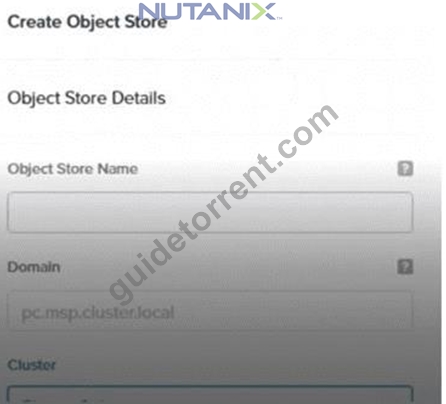
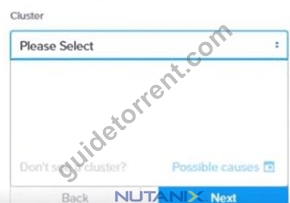
A user is logged into Prism Central and has been tasked with creating a new object store.
What could be the cause no clusters are being listed?
- A. Prism Element was registered to Prism Central only 1 hour ago.
- B. Access was granted to Prism Element less than 5 minutes ago.
- C. Only the local Prism Element Admin can create object stores.
- D. Only the local Prism Central Admin can create object stores.
Answer: B
Explanation:
According to the Nutanix Unified Storage Administration (NUSA) course, specifically in the module
"Deploying and Configuring Nutanix Objects," theObject Store creationprocess within Prism Central depends on theregistration and access synchronizationbetween Prism Central and Prism Element. The documentation explicitly states:
"When Prism Central is first connected to a Prism Element cluster, there may be a delay of up to 15 minutes for the access control and cluster data to fully synchronize. During this time, certain cluster resources may not appear when attempting to create new object stores." This statement confirms that if the access was granted to Prism Elementless than 5 minutes ago, the cluster will not yet be visible in the "Cluster" drop-down list. This delay in synchronization is the reason for the empty cluster list in the interface.
* Option Ais incorrect because Prism Central administrators, not just local Prism Element admins, have the authority to create object stores.
* Option Bis incorrect because the delay is not tied to the 1-hour registration time, but rather the few minutes required for initial synchronization.
* Option Cis incorrect because the Prism Element admin role is not a prerequisite for this task within Prism Central.
Reference:
Nutanix Unified Storage Administration (NUSA) course - Module: Deploying and Configuring Nutanix Objects - Section: Synchronization and Cluster Visibility in Prism Central.
Nutanix Unified Storage (NCP-US) Study Guide - Topic: Object Store Creation Requirements and Synchronization Delays.
NEW QUESTION # 31
An administrator wants to control the user visibility of SMB folders and files based on user permissions.
What feature should the administrator choose to accomplish this?
- A. File Analytics
- B. Role Based Access Control (RBAC)
- C. Files blocking
- D. Access Based-Enumeration (ABE)
Answer: D
Explanation:
Access Based-Enumeration (ABE)is a feature in Nutanix Files that controls whether users cansee folders and filesfor which they do not have access permissions. When ABE is enabled:
* Users will only see the folders/files they are authorized to access.
* Items for which they have no permissions will be hidden from view.
The NUSA course describes this feature:
"Access Based-Enumeration (ABE) ensures that users browsing a share will only see folders and files that they have permission to access, improving security and minimizing confusion." Thus,ABEis the precise feature for controllinguser visibilityof SMB shares based on permissions.
NEW QUESTION # 32
Question:
What would an administrator need to do in order to move tagged objects to a remote Nutanix Objects instance after a period of time?
- A. Configure WORM on the Bucket and a Lifecycle Policy to tier tagged objects within the bucket.
- B. Configure WORM on the Bucket and a Lifecycle Policy to tier all objects within the bucket.
- C. Configure a Cloud Bucket Endpoint with the Nutanix provider and a Lifecycle Policy to tier all objects within the bucket.
- D. Configure a Cloud Bucket Endpoint with the Nutanix provider and a Lifecycle Policy to tier tagged objects within the bucket.
Answer: D
Explanation:
Lifecycle Policiesin Nutanix Objects allow administrators toautomate data tiering and archivalbased on specific criteria, including object tagging. According to the NUSA training:
"A Lifecycle Policy, combined with a Cloud Bucket Endpoint, enables automatic movement of objects (based on tags) to a remote Nutanix Objects instance or compatible S3 storage." Here's the detailed process:
The administrator first configures aCloud Bucket Endpointto establish connectivity to theremote Nutanix Objects instance.
Then, they create aLifecycle Policythat targets objects with specific tags for tiering.
This policy ensures that onlytagged objectsmeeting the policy's criteria are moved to the remote storage location.
Enabling WORM on the bucket is not required for tiering; WORM is forimmutability. Thekey mechanism for tiering tagged objects is:
#Cloud Bucket Endpoint + Lifecycle Policy for tagged objects.
NEW QUESTION # 33
An administrator is tasked with migrating physical SQL workloads from a legacy SAN platform to a newly- deployed Nutanix environment. The current physical hosts boot from SAN. The Nutanix environment has plenty of storage resources available. Which action can the administrator take to complete this task?
- A. Boot using PXE protocol with Nutanix Files
- B. Boot using the NFS protocol with Nutanix Files
- C. Boot over iSCSI using Nutanix Volumes
- D. Boot using Nutanix Object stores
Answer: C
Explanation:
To migrate physical SQL workloads from a legacy SAN platform where hosts boot from SAN to a Nutanix environment, the administrator can useNutanix Volumesto enable booting overiSCSI. Nutanix Volumes is a block storage solution that provides iSCSI-based storage, allowing external hosts (such as physical servers) to access Nutanix storage as block devices. This is ideal for replacing SAN-based boot volumes, as it supports the same iSCSI protocol used in traditional SAN environments.
According to theNutanix Unified Storage Administration (NUSA)course, Nutanix Volumes enables external hosts to connect to Nutanix storage via iSCSI, which can be used for boot volumes or data volumes.
The course emphasizes that "Nutanix Volumes supports iSCSI boot for physical servers, making it a suitable solution for migrating workloads from legacy SAN environments to Nutanix." This allows the administrator to configure the physical SQL servers to boot from iSCSI targets provisioned on Nutanix Volumes, leveraging the Nutanix cluster's storage resources.
TheNutanix Certified Professional - Unified Storage (NCP-US)study guide further details that Nutanix Volumes can be configured to present iSCSI LUNs to physical hosts, which can be used for both operating system boot and application data storage. For the SQL workloads, the administrator can create iSCSI targets on Nutanix Volumes, configure the physical hosts' iSCSI initiators to connect to these targets, and migrate the boot and data volumes from the legacy SAN to Nutanix.
The other options are not suitable for this task:
* Boot using PXE protocol with Nutanix Files: Nutanix Files is a file storage solution that supports SMB and NFS protocols, not PXE (Preboot Execution Environment) booting. PXE is typically used for network-based OS installation, not for booting SQL workloads or replacing SAN-based boot volumes.
* Boot using the NFS protocol with Nutanix Files: Nutanix Files supports NFS for file sharing, but NFS is not designed for booting physical servers. It is used for file-level access, not block-level access required for boot volumes.
* Boot using Nutanix Object stores: Nutanix Objects is an object storage solution designed for S3- compatible APIs, not for block or file-based booting. It is unsuitable for hosting bootable volumes or SQL workloads.
The NUSA course documentation highlights that "Nutanix Volumes provides a seamless migration path for SAN-based workloads, including boot-from-SAN configurations, by leveraging iSCSI to present storage to physical hosts." This makes it the only viable option for the described migration task.
References:
Nutanix Unified Storage Administration (NUSA) Course, Section on Nutanix Volumes: "Configuring iSCSI for external hosts and boot volumes." Nutanix Certified Professional - Unified Storage (NCP-US) Study Guide, Topic 1: Deploy and Upgrade Nutanix Unified Storage, Subtopic: "Nutanix Volumes for SAN workload migration." Nutanix Documentation (https://www.nutanix.com), Nutanix Volumes Administration Guide: "Using iSCSI for boot and data volumes."
NEW QUESTION # 34
An administrator has noticed that the object stores have stopped gathering analytics data approximately nine months after they were enabled. How can the administrator resume Data Lens functionality?
- A. Remove and re-add IAM user permissions on the object store
- B. Rename the bucket within the object store
- C. Disable and re-enable analytics on the object store
- D. Disable and re-enable versioning on the object store
Answer: C
Explanation:
The issue involves Nutanix Objects stopping the collection of analytics data for Nutanix Data Lens approximately nine months after being enabled. To resume Data Lens functionality, the administrator should disable and re-enable analytics on the object store. Nutanix Data Lens is a cloud-based service that provides analytics and lifecycle management for Nutanix Objects, and issues with analytics data collection can often be resolved by resetting the analytics configuration.
TheNutanix Unified Storage Administration (NUSA)course states, "If Nutanix Data Lens stops gathering analytics data for an object store, a common troubleshooting step is to disable and re-enable analytics on the object store to reset the connection and resume data collection." This process forces the object store to re- establish its integration with Data Lens, clearing any potential configuration or connectivity issues that may have caused the analytics to stop. The nine-month period suggests a possible timeout or licensing issue with Data Lens, which can be resolved by this action.
TheNutanix Certified Professional - Unified Storage (NCP-US)study guide further elaborates that
"disabling and re-enabling analytics on a Nutanix Objects store is an effective way to troubleshoot Data Lens functionality issues, ensuring that the object store re-syncs with Data Lens for analytics data collection." The administrator can perform this action through Prism Central by navigating to the Nutanix Objects configuration, disabling analytics for the affected object store, and then re-enabling it.
The other options are incorrect:
* Rename the bucket within the object store: Renaming a bucket does not affect Data Lens integration or analytics data collection, as Data Lens operates at the object store level, not the bucket level.
* Remove and re-add IAM user permissions on the object store: IAM user permissions control access to the object store but are not directly related to Data Lens analytics collection. Changing permissions is unlikely to resolve this issue.
* Disable and re-enable versioning on the object store: Versioning allows multiple versions of objects to be stored but does not impact Data Lens analytics functionality.
The NUSA course documentation emphasizes that "resetting analytics by disabling and re-enabling the feature on the object store is a standard troubleshooting step to resume Data Lens functionality when analytics data collection stops unexpectedly." References:
Nutanix Unified Storage Administration (NUSA) Course, Section on Nutanix Data Lens: "Troubleshooting Data Lens analytics for Nutanix Objects." Nutanix Certified Professional - Unified Storage (NCP-US) Study Guide, Topic 4: Troubleshoot Nutanix Unified Storage, Subtopic: "Resolving Data Lens analytics issues for Nutanix Objects." Nutanix Documentation (https://www.nutanix.com), Nutanix Data Lens Guide: "Troubleshooting analytics data collection for object stores."
NEW QUESTION # 35 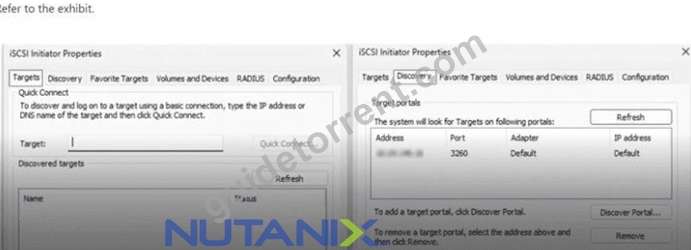
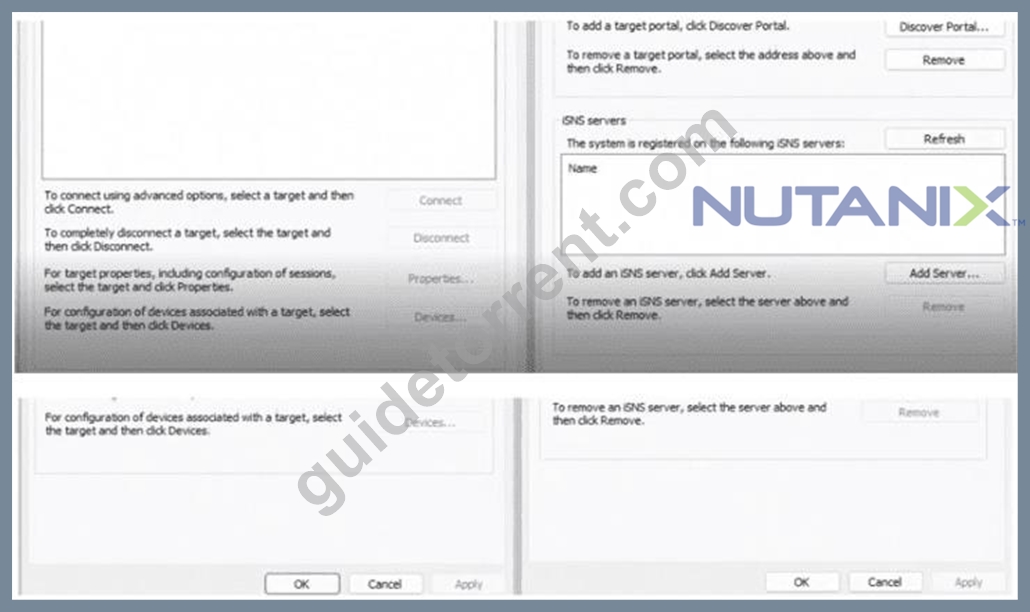
Question:
An administrator is attempting to connect to a newly created 1TiB Volume Group on a Windows Server 2022 VM.
* In the iSCSI Initiator Properties >Discovery tab, the Data Services IP (DSIP) appears as a target portal.
* But in theTargets tab, the Volume Group (LUN) is not listed as a discovered target.
What is the most likely cause of this?
- A. The Windows VM needs to be rebooted to recognize the Volume Group.
- B. The Volume Group is too large for Windows to recognize.
- C. The iSCSI initiator service is not started on the Windows VM.
- D. The Windows VM IQN was not added to the client allowlist.
Answer: D
Explanation:
Themost likely causein this scenario is that theWindows VM's iSCSI Initiator IQN(iSCSI Qualified Name) wasnot added to the client allowlistfor the newly created Volume Group (VG) on the Nutanix cluster.
How this works in Nutanix Unified Storage:
* When creating a VG, Nutanix requires you to definewhich iSCSI initiators (by IQN)are allowed to connect to it.
* If the Windows VM's IQN isnot on the allowlist, Nutanix willnot present the LUN(Volume Group) to that initiator, even though the target portal (DSIP) itself is reachable.
This is acommon stepemphasized in the NUSA and NCP-US materials:
"After creating a Volume Group, administrators must add the iSCSI initiator IQNs of client VMs to the client allowlist. Without this, the initiator can discover the target portal (via DSIP) but will not see the actual LUN (Volume Group)." The other options:
* B. Volume Group size too large: Windows Server 2022 fully supports 1TiB+ volumes if properly configured.
* C. Rebooting the VM: This does not resolve missing allowlist entries.
* D. iSCSI initiator service not started: If this were the case, the discovery portal itself would not be visible.
Thus, the administrator must:
#Retrieve the IQN of the Windows VM (from the iSCSI Initiator Properties > Configuration tab).
#Add that IQN to the Nutanix Volume Group's client allowlist in Prism.
This willresolvethe missing LUN (Volume Group) discovery.
NEW QUESTION # 36
An administrator is implementing two production networks for Nutanix Objects:
* Objects Storage Network (internal)
* Objects Public Network (external)In which two ways is it recommended the administrator configure these networks? (Choose two.)
- A. Objects Storage Network on the same network as the Controller VM (CVM).
- B. Objects Storage Network and Objects Public Network on the same Virtual Network.
- C. Objects Storage Network and Objects Public Network on different Virtual Networks.
- D. Objects Storage Network on a different network to the Controller VM (CVM).
Answer: C,D
Explanation:
Network isolation is critical for security and performance:
* Option C: Storage (internal) and Public (external) networks must be on separate VLANs/virtual networks to prevent unauthorized access to internal traffic.
* Option D: The Storage Network should be isolated from the CVM network to avoid AOS cluster interference.
* Incorrect:
* A: CVMs manage AOS storage; Objects Storage Network should not share this segment.
* B: Combining networks violates security best practices.
Reference:Nutanix Objects Deployment Guide:
"Place Objects Storage Network on a dedicated internal network, segregated from Public Networks and CVM traffic. Use distinct virtual networks for each."(Chapter: "Network Segmentation Best Practices")Nutanix NUSA Course:"Isolate Storage Network (backend) from Public Network (client-facing) and CVM network to ensure cluster stability and security."(Module: "Objects Network Design")
NEW QUESTION # 37
What is the maximum number of object stores that can be deployed per AOS cluster?
- A. 0
- B. 1
- C. 2
- D. 3
Answer: D
Explanation:
A single AOS cluster supports a maximum of 4 Nutanix Object Stores. Each object store is an independent instance with dedicated resources.
Reference:Nutanix Objects Planning Guide:
"A cluster supports up to four Object Stores, each capable of hosting multiple buckets and scaling independently."(Chapter: "Deployment Limits")Nutanix NUSA Course:"The hard limit of 4 Object Stores per cluster ensures resource isolation and performance stability."(Module: "Objects Sizing and Scaling") According to the Nutanix Unified Storage documentation and the Nutanix Unified Storage Administration (NUSA) course materials, each AOS (Acropolis Operating System) cluster can support a maximum of4 object stores. This maximum number ensures stability, scalability, and performance consistency within the cluster environment.
The object store in Nutanix Unified Storage is implemented using Nutanix Objects, which leverages a distributed, scale-out architecture. When deploying object stores within an AOS cluster, the system assigns storage resources and metadata handling roles across the cluster nodes to maintain high availability and data protection.
The limitation of4 object stores per clusteris defined to optimize resource utilization and prevent excessive load on cluster services that manage object metadata and data replication. Each object store is backed by Nutanix's robust storage fabric, which ensures performance and reliability while maintaining strict isolation between different object stores.
In the Nutanix Unified Storage Administration course, the topic of deploying object stores covers:
Deployment Limits:Each AOS cluster is capable of hosting up to 4 object stores, which allows for flexibility while maintaining performance boundaries.
Design Considerations:The 4-object store limit is recommended to avoid resource contention, as object stores have significant metadata and data handling overhead that can impact cluster stability if limits are exceeded.
Scalability:While 4 object stores can be deployed per cluster, Nutanix's architecture allows for horizontal scaling by deploying additional object stores across multiple clusters as needed for different use cases or tenant isolation.
Management of Object Stores:Unified Storage leverages Prism Central and Prism Element to configure and monitor object stores, ensuring easy management of deployed object services within the cluster's limit.
This information is consistently emphasized in the official NCP-US study guide and the NUSA course presentations to ensure administrators and architects understand these design and deployment limitations.
NEW QUESTION # 38
An administrator has an existing four-node Nutanix cluster at a primary site with three FSVM instances deployed. They want to configure Smart DR on a five-node Nutanix cluster at the recovery site.
How many FSVMs should be deployed on the recovery site for Smart DR?
- A. 0
- B. 1
- C. 2
- D. 3
Answer: A
Explanation:
Smart DR(Disaster Recovery) for Nutanix Files ensures that the file server VMs (FSVMs) at therecovery site mirror the configuration of the primary site. Specifically, it requires that:
"The number of FSVMs deployed at the recovery site mustmatchthe number of FSVMs at the primary site." The primary site has3 FSVMs.
Therefore, the recovery site must also have3 FSVMsdeployed to ensure consistency and proper operation of Smart DR for file services.
NEW QUESTION # 39
Exhibit: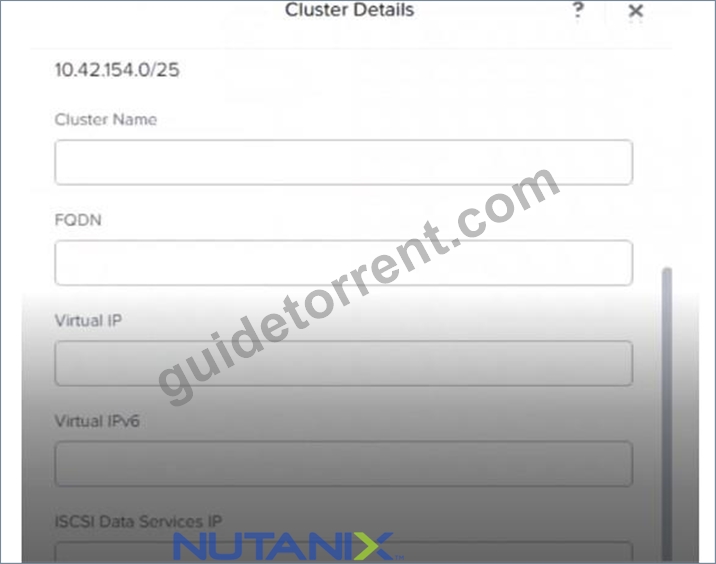
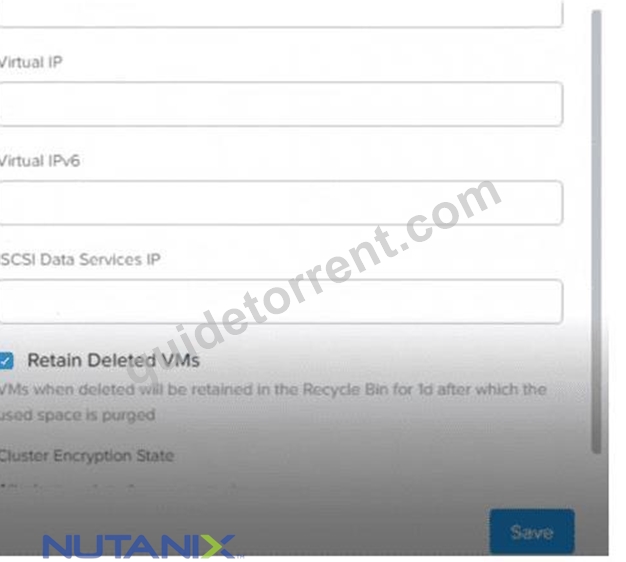
An administrator is enabling Nutanix Volumes for use with workloads within a Nutanix-based environment.
Based on the exhibit, which field is required by Nutanix Volumes to be populated?
- A. iSCSI Data Services IP
- B. FQDN
- C. Virtual IP
- D. Virtual IPv6
Answer: A
Explanation:
The exhibit shows the "Cluster Details" page in a Nutanix Prism interface, displaying fields such as Cluster Name, FQDN, Virtual IP, Virtual IPv6, and iSCSI Data Services IP. The administrator is enabling Nutanix Volumes, which is a block storage service that provides iSCSI-based storage for workloads. Nutanix Volumes allows external hosts or VMs to connect to the Nutanix cluster via iSCSI, requiring a specific IP address for iSCSI communication.
According to theNutanix Unified Storage Administration (NUSA)course, "Nutanix Volumes requires the iSCSI Data Services IP to be configured in the cluster settings to enable iSCSI connectivity for external hosts or workloads." The iSCSI Data Services IP is a dedicated IP address used by the Nutanix cluster to handle iSCSI traffic, ensuring that iSCSI initiators (clients) can connect to the cluster and access block storage volumes. This field must be populated to enable Nutanix Volumes functionality, as it serves as the endpoint for iSCSI communication.
TheNutanix Certified Professional - Unified Storage (NCP-US)study guide further elaborates that "the iSCSI Data Services IP is a mandatory field when enabling Nutanix Volumes, as it defines the IP address that external iSCSI initiators use to connect to the cluster for block storage access." Without this IP address, Nutanix Volumes cannot function, as there would be no designated network endpoint for iSCSI traffic.
In the exhibit, the "iSCSI Data Services IP" field is present, indicating its relevance to Nutanix Volumes configuration. The other fields are not mandatory for enabling Nutanix Volumes:
* FQDN (Fully Qualified Domain Name): The FQDN is optional and used for resolving the cluster's name in DNS. It is not required for Nutanix Volumes to function, as iSCSI connectivity relies on IP addresses, not DNS names.
* Virtual IPv6: This field is for configuring a Virtual IP using IPv6 for cluster management access (e.g., Prism GUI). Nutanix Volumes does not require IPv6; the iSCSI Data Services IP typically uses IPv4, and IPv6 support is optional.
* Virtual IP: The Virtual IP (IPv4) is used for accessing the Prism GUI and other cluster management services. While recommended for cluster management, it is not specifically required for Nutanix Volumes, as iSCSI traffic uses the iSCSI Data Services IP.
The NUSA course documentation emphasizes that "configuring the iSCSI Data Services IP is a prerequisite for enabling Nutanix Volumes, ensuring that iSCSI initiators can connect to the cluster for block storage operations." The administrator must populate this field with a valid IP address from the cluster's network to enable Nutanix Volumes successfully.
References:
Nutanix Unified Storage Administration (NUSA) Course, Section on Nutanix Volumes: "Configuring iSCSI Data Services IP for Nutanix Volumes." Nutanix Certified Professional - Unified Storage (NCP-US) Study Guide, Topic 2: Configure and Utilize Nutanix Unified Storage, Subtopic: "Nutanix Volumes setup and iSCSI configuration." Nutanix Documentation (https://www.nutanix.com), Nutanix Volumes Administration Guide: "Enabling Nutanix Volumes and configuring iSCSI Data Services IP."
NEW QUESTION # 40
Question:
An administrator needs to configure Nutanix Objects in AHV.
Which IP range must be available for this task?
- A. 172.100.0.0/16 and 172.200.0.0/16
- B. 192.168.1.0/24
- C. 10.100.0.0/16 and 10.200.0.0/16
- D. 10.100.1.0/24
Answer: C
Explanation:
When deploying Nutanix Objects, internal communication and data flow between Object services are isolated usinginternal overlay IP rangesto avoid collisions with existing customer networks.
The NCP-US and NUSA course materials state:
"Nutanix Objects requires two separate internal IP address ranges: 10.100.0.0/16 and 10.200.0.0/16. These ranges are used exclusively for internal communication within the Nutanix Objects deployment, such as for object metadata, S3 gateway, and load balancing services."
* These10.x.x.x rangesmust not overlap with existing client or management networks.
* They provide fully isolated internal object service communication.
NEW QUESTION # 41
Question:
A user with Edit Buckets permission has been tasked with deleting old Nutanix Objects buckets created by a former employee.
Why is this user unable to execute the task?
- A. User does not have the Delete Buckets permission.
- B. The buckets don't have Object Versioning enabled.
- C. The buckets don't have a Lifecycle Policy associated.
- D. User is only able to delete buckets assigned to them.
Answer: A
Explanation:
In Nutanix Objects,bucket management permissionsare granularly controlled. TheEdit Bucketspermission allows a user tomodify bucket configurations(such as policy changes, tagging, and settings), but it doesnot grant the ability todeletethe bucket.
From the NUSA training:
"The Delete Buckets permission is separate from Edit Buckets. Users with Edit Buckets can change configurations but cannot remove the bucket itself." Thus, the user's inability to delete buckets stems fromlacking the explicit Delete Buckets permission.
NEW QUESTION # 42
......
Actual Questions Answers Pass With Real NCP-US-6.10 Exam Dumps: https://www.guidetorrent.com/NCP-US-6.10-pdf-free-download.html
NCP-US-6.10 Dumps Prepare Your Exam With 108 Questions: https://drive.google.com/open?id=1X3pggtmiCqtT4vf6nieeH6Fx9E8n23kZ