
2024 UiPath-ADPv1 Question Bank: Free PDF Download Recently Updated Questions
UiPath-ADPv1 Certification Exam Dumps with 188 Practice Test Questions
NEW QUESTION # 112
What is the default priority value for the Job Priority field in UiPath Orchestrator when starting a job manually?
- A. Medium
- B. Low
- C. Inherited
- D. High
Answer: C
Explanation:
When starting a job manually in UiPath Orchestrator, the default priority value for the Job Priority field is Inherited. This means that the job inherits the priority value that was set at the process level when the package was deployed. The possible priority values are High, Normal, and Low. The priority value determines the order in which the jobs are executed by the robots, with higher priority jobs being executed first. The priority value can be changed manually when starting a job, or it can be set dynamically using the Start Job activity in a workflow. References: [Starting a Job], [Job Priority]
NEW QUESTION # 113
Suppose you have the following workflow that verifies if the text value of an element is equal to "Work Items":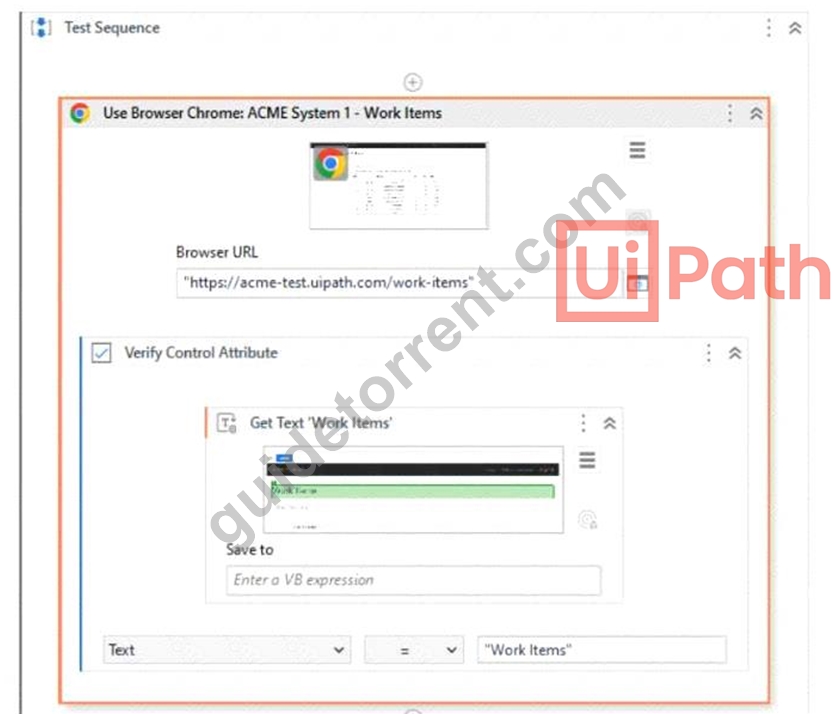
The configuration for the Verify Control Attribute and Get Text activities is shown below: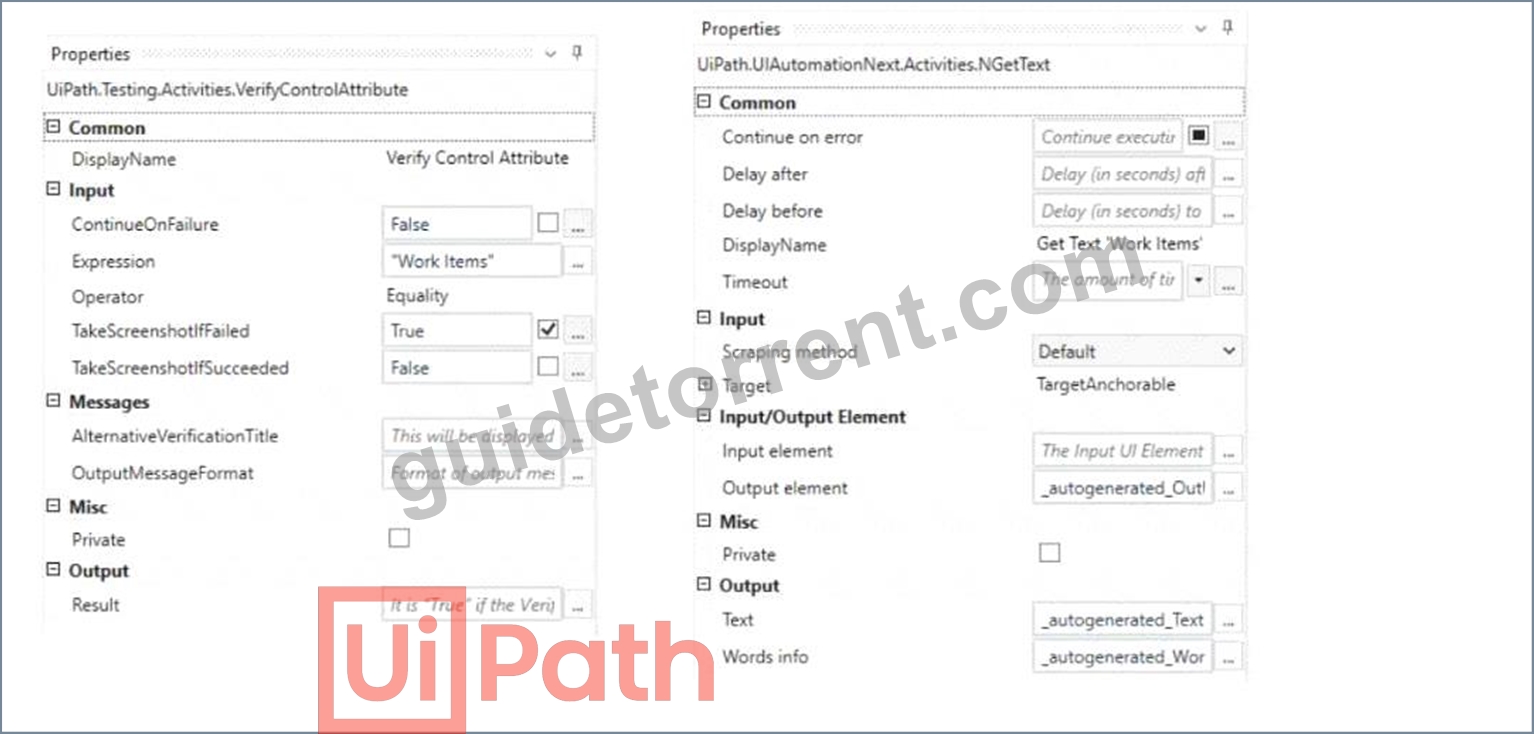
The element and its selector are highlighted in the image below: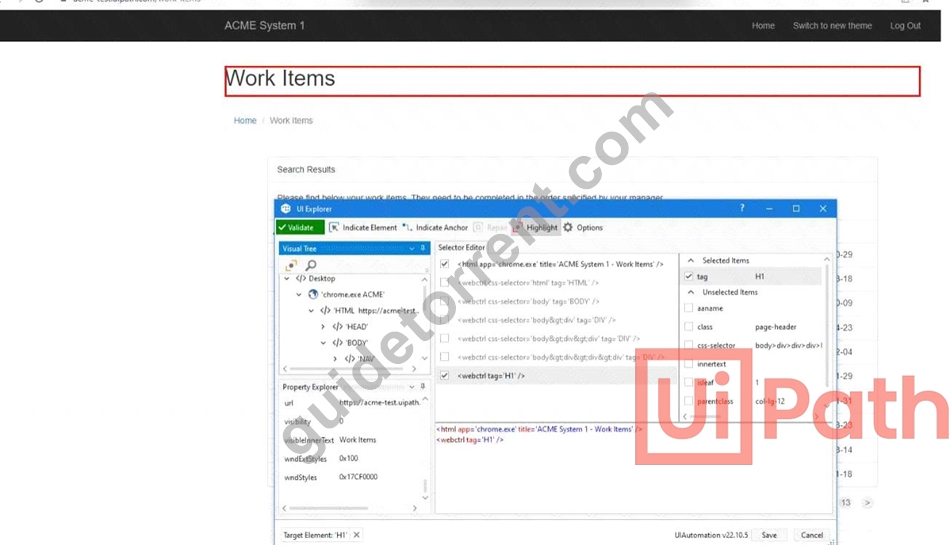
Taking into consideration that the page shown above will be present on screen at execution time, what will be the result of the Verify Control Attribute activity?
- A. Verification will be passed.
- B. An exception will be thrown because there is no variable set in the Save to property of the Get text activity.
- C. Verification will be failed because the actual value is different than expected value.
- D. Verification will not be executed.
Answer: A
Explanation:
The workflow in question uses a 'Verify Control Attribute' activity to check if the text value of a UI element is equal to "Work Items". The Get Text activity is used to retrieve the text from the specified UI element, and the result of this activity is compared against the expected value "Work Items".
From the provided information, the 'Verify Control Attribute' activity has been set up with the Expression
"Work Items" and the Operator set to Equality. The 'Get Text' activity is configured to extract the text from the UI element with the visible text "Work Items", as indicated by the selector shown in the image.
Since the actual value of the UI element's text is "Work Items" (which matches the expected value in the
'Verify Control Attribute' activity), and provided that the 'Get Text' activity successfully retrieves this value, the verification will pass. The configuration indicates that the activity should take a screenshot only if the verification fails (TakeScreenshotIfFailed is set to True), which will not be the case here.
Therefore, assuming that there are no other issues such as incorrect selectors or unexpected changes to the UI element at execution time, the result of the 'Verify Control Attribute' activity will be a pass.
References:
UiPath Documentation: Verify Control Attribute Activity
NEW QUESTION # 114
A developer wants to create an automation in which the input from the user and pre-defined conditions determine the transition between stages. In UiPath Studio, which is the recommended type of workflow that meets the requirement?
- A. State Machine
- B. Global Exception Handler
- C. Workflow
- D. Flowchart
Answer: D
NEW QUESTION # 115
What is a pre-requisite for running functional test cases in REFramework?
- A. Invoke Main XAML file
- B. Invoke InitAIISettings XAML file
- C. Invoke Process XAML file
- D. Invoke SetTransactionStatus XAML file
Answer: B
Explanation:
A pre-requisite for running functional test cases in REFramework is to invoke the InitAIISettings XAML file.
This file is responsible for initializing the AI Fabric settings and connecting to the Orchestrator. It also checks if the AI Fabric environment is ready and if the ML skills are deployed and available. Without invoking this file, the functional test cases that use AI Fabric features will not work properly. References: [REFramework for AI Fabric]
NEW QUESTION # 116
When encountering an ApplicationException, what occurs if the developer chooses InvalidOperationException as the exception handler within the Catches section of the Try Catch activity?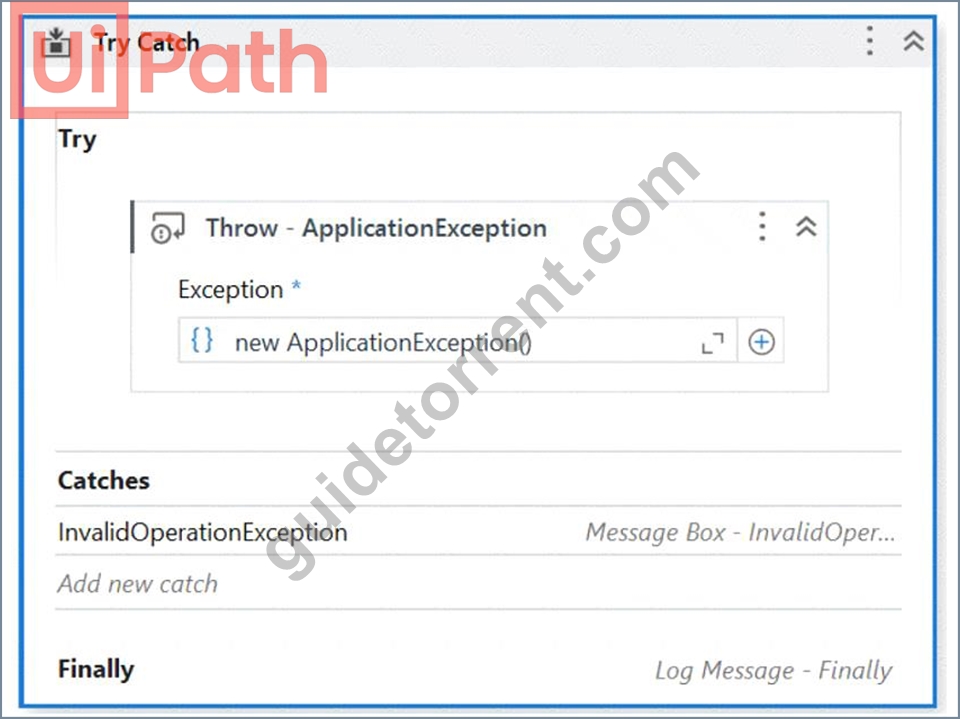
- A. No exceptions are happening and the workflow continues to execute.
- B. No exception is thrown and the Finally block executes.
- C. A runtime error occurs and the Finally block is not executed.
- D. The Finally block is executed and the Catches section catches the exception.
Answer: D
Explanation:
In a Try Catch activity within UiPath, when an exception is thrown that does not match any of the exception types specified in the Catches section, the exception is unhandled by the Catches section. If the thrown exception is an ApplicationException and the Catches section is only configured to handle an InvalidOperationException, then the ApplicationException is not caught because it is a different type of exception.
However, regardless of whether the exception is caught, the Finally block always executes. The Finally block is designed to run after the Try block and after any Catch blocks are checked for matches (regardless of whether a match is found or not).
Therefore, the correct answer is:
A: The Finally block is executed and the Catches section catches the exception.
In this context, "the Catches section catches the exception" means that the Catches section is evaluated for a match. Since ApplicationException is not handled by the InvalidOperationException catch block, the exception is not actually caught, but the Finally block will still execute.
NEW QUESTION # 117
Given a dataiable "dt" with the following header:
"Surname. Address. Zip Code, Given Name, Phone Number.
What is the correct configuration of the Invoke Method activity so that the resulting header will be:
"Surname. Given Name. Address. Zip Code. Phone Number".
- A.
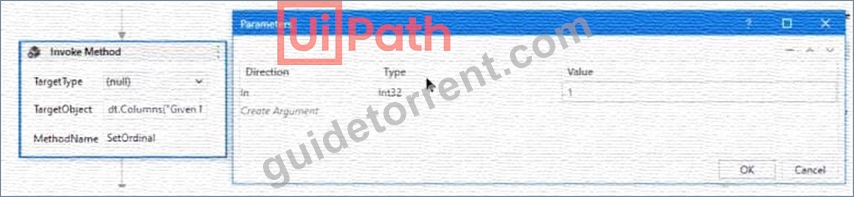
- B.
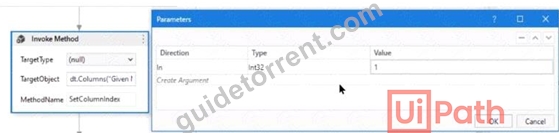
- C.
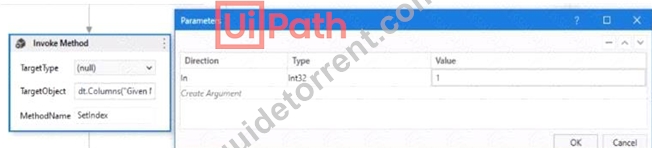
- D.
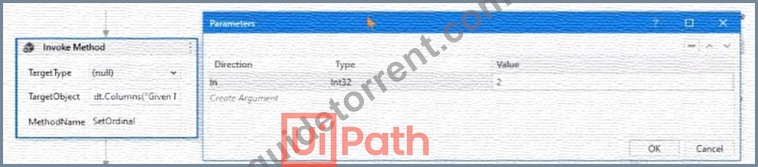
Answer: A
NEW QUESTION # 118
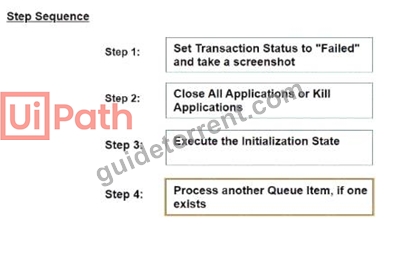
What is the correct sequence of steps in a REFramework project that is linked to Orchestrator it an application exception occurs on a Queue Item m the Process Transaction stale?
Instructions: Drag the Description found on the "Left" and drop on the correct Step Sequence found on the Right".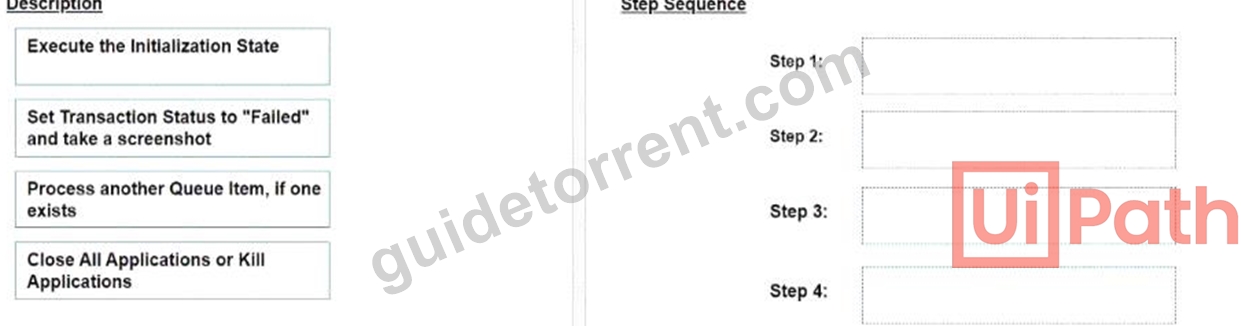
Answer:
Explanation: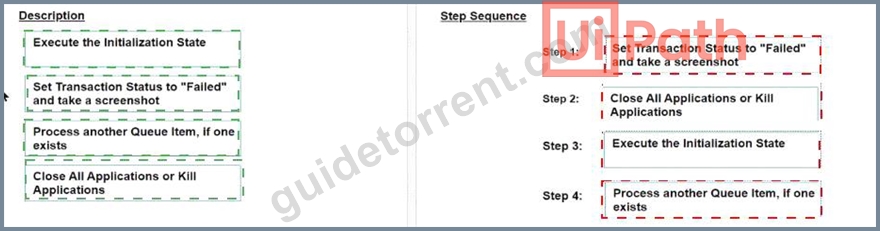
NEW QUESTION # 119
Which command in the UiPath installation folder configures the UIPath.RemoteDebugging.Agent utility on a Windows robot to accept remote debugging requests from Studio?
- A. UiPath.RemoteDebuqqinq.Aqent.exe start -port -password -verbose
- B. UiPath.RemoteDebuqqinq.Aqent.exe enable -port -username -password -verbose
- C. dotnet ./UiPath.RemoteDebuqqinq.Aqent.dll enable -port -password -verbose
- D. UiPath-RemoteDebuqqinq.Aqent.exe enable -port -password -verbose
Answer: D
NEW QUESTION # 120
What is the purpose of credential stores in UiPath Orchestrator?
- A. To store non-sensitive data and configuration settings for UiPath Studio projects.
- B. To securely store sensitive data such as Robot credentials and Credential Assets for use in automation processes.
- C. To serve as a centralized location for storing pre-built automation workflows and processes.
- D. To store Orchestrator event loos and related data for auditing purposes.
Answer: B
NEW QUESTION # 121
What role do Triggers play in the UiPath Integration Service?
- A. Manage connections between UiPath Studio and third-party applications.
- B. Provide a mechanism for starting processes on a scheduled basis from Orchestrator.
- C. Assist in the creation of automation projects by providing event-based activities.
- D. Provide a mechanism for subscribing to specific events from third-party applications, automatically starting processes in Orchestrator.
Answer: D
NEW QUESTION # 122
"Process A" is scheduled to run at 2:00 PM using a time trigger with the Schedule ending of Job execution feature configured to stop the job after 20 minutes. Assuming that the robots are busy and "Process A" is queued until 2:05 PM. at what time will "Process A* be stopped?
- A. 2:25 PM
- B. 2:28 PM
- C. 2:20 PM
- D. 2:05 PM
Answer: A
Explanation:
"Process A":
* The process is scheduled to run at 2:00 PM, but due to busy robots, it starts at 2:05 PM.
* The Schedule ending of Job execution feature is configured to stop the job after 20 minutes.
* Therefore, "Process A" will be stopped 20 minutes after it started, which is at 2:25 PM.
NEW QUESTION # 123
A developer intends to enter text into an input field using a combination of a string and a hotkey. The input action should take place within a hidden or minimized window.
Which input method(s) can be used individually for the Type Into activity?
- A. Simulate only.
- B. Same as App/Browser and Simulate.
- C. Window Messages only.
- D. Simulate and Window Messages.
Answer: D
Explanation:
The Type Into activity has three input methods: Default, Simulate, and Window Messages. The Default method uses hardware drivers to send keystrokes to the target application, which means it requires the window to be active and visible. The Simulate and Window Messages methods use software drivers to send keystrokes to the target application, which means they can work in the background, even if the window is hidden or minimized. However, the Simulate method cannot send hotkeys, while the Window Messages method can.
Therefore, the only input methods that can be used individually for the Type Into activity to enter text and hotkeys in a hidden or minimized window are Simulate and Window Messages. References:
*Type Into
*Input Methods
NEW QUESTION # 124
Consider testing a workflow that computes the sum of two numbers having the data driven test data from the Excel file below: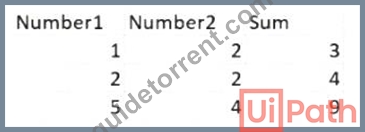
Expanding the functionality of the workflow to compute the sum of three numbers, the data needs to be updated as well to accommodate the new scenario: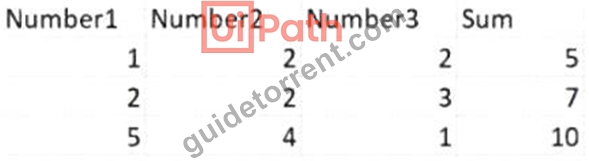
What are steps to do that?
- A. Click Right on the Test Case and select Refresh Test Data
- B. Click Right on the Test Case and select Add Test Data.
- C. Click Right on the Test Case and select Remove Test Data.
- D. Click Right on the Test Case and select Update Test Data
Answer: A
Explanation:
When expanding the functionality of a workflow to compute the sum of three numbers instead of two, and having to update the test data in an Excel file accordingly, you would generally need to:
Open the Excel file that contains the test data.
Add a new column for the third number (e.g., Number3).
Fill in the data for the new column with the appropriate values for the test cases.
Save the Excel file with the updated data.
Refresh or update the data source in the test case to reflect these changes.
This is because "Refresh Test Data" suggests that the test case will re-import or re-read the test data from its source, which in this case is the updated Excel file with the additional Number3 column. "Update Test Data" might also seem appropriate, but it typically refers to a scenario where you need to update the test case's reference to the data, not the structure of the data itself. "Add Test Data" and "Remove Test Data" are not appropriate as they imply adding a new data set or removing an existing one, rather than refreshing or updating the existing data set with the new column.
NEW QUESTION # 125
In a UiPath development scenario, which type of process design would be the most appropriate for an automation task that executes actions in a straightforward progression without iteration or branching?
- A. Iterative Process
- B. Linear Process
- C. Sequential Process
- D. Transactional Process
Answer: C
Explanation:
A sequential process is a type of process design that executes actions in a straightforward progression without iteration or branching. A sequential process is composed of a series of activities that are executed one after another, from top to bottom, in a linear fashion. A sequential process is best suited for simple scenarios when activities follow each other and there is no need for complex logic or decision making12.
The other options are not appropriate for an automation task that executes actions in a straightforward progression without iteration or branching, because they involve different types of process design that require more complex structures and logic. For example:
A transactional process is a type of process design that executes actions on a set of data items, one at a time, in a loop. A transactional process is composed of a dispatcher that adds data items to a queue, and a performer that processes each data item from the queue and updates its status. A transactional process is best suited for scenarios when activities need to be repeated for each data item and there is a need for reliability and scalability34.
An iterative process is a type of process design that executes actions repeatedly until a certain condition is met or a certain number of iterations is reached. An iterative process is composed of a loop that contains a set of activities and a condition that controls the exit of the loop. An iterative process is best suited for scenarios when activities need to be performed multiple times and there is a need for dynamic control of the execution flow56.
A linear process is not a type of process design, but a term that refers to a process that has a clear start and end point, and a well-defined sequence of steps that lead to a specific outcome. A linear process can be implemented using different types of process design, depending on the complexity and logic of the steps involved7.
References:
1: Studio - Workflow Design - UiPath Documentation Portal 2: Studio - Sequence - UiPath Activities 3: Studio - Transactional Business Process - UiPath Documentation Portal 4: Studio - Transactional Process - UiPath Activities 5: Studio - Control Flow - UiPath Documentation Portal 6: Studio - Loops - UiPath Activities 7: What is a Linear Process? - Definition from Techopedia
NEW QUESTION # 126
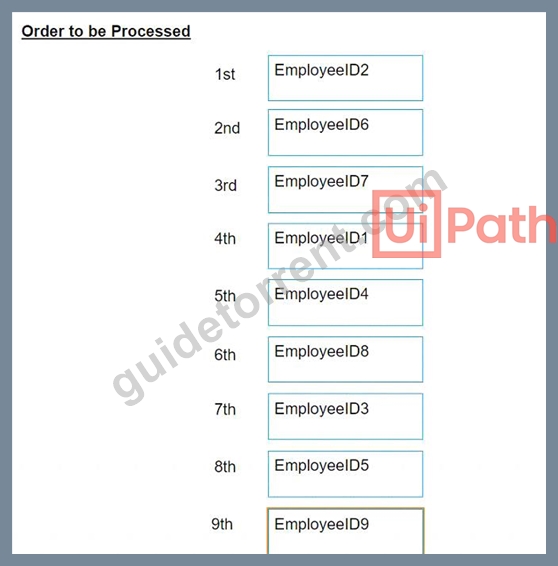
The provided exhibit displays the representation of the "Deadline" field using the yyyy-mm-dd format.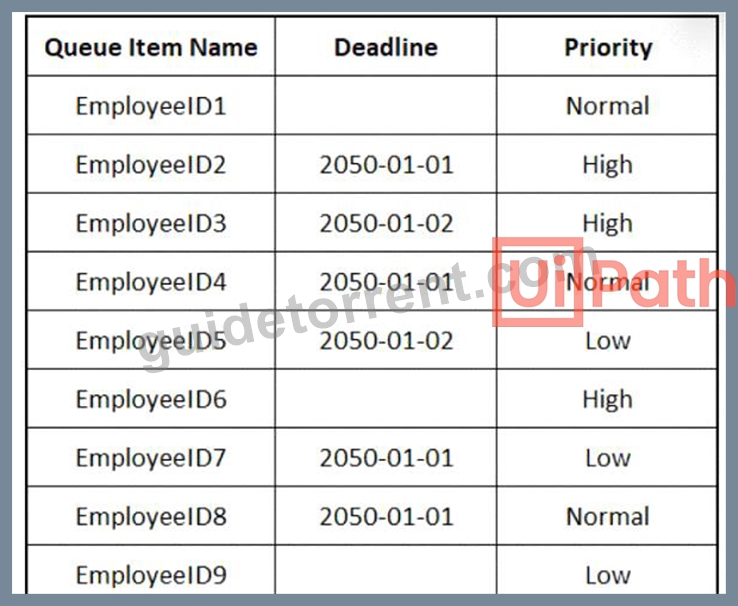
In what order should the Queue Items be processed by a single robot executing a Performer workflow?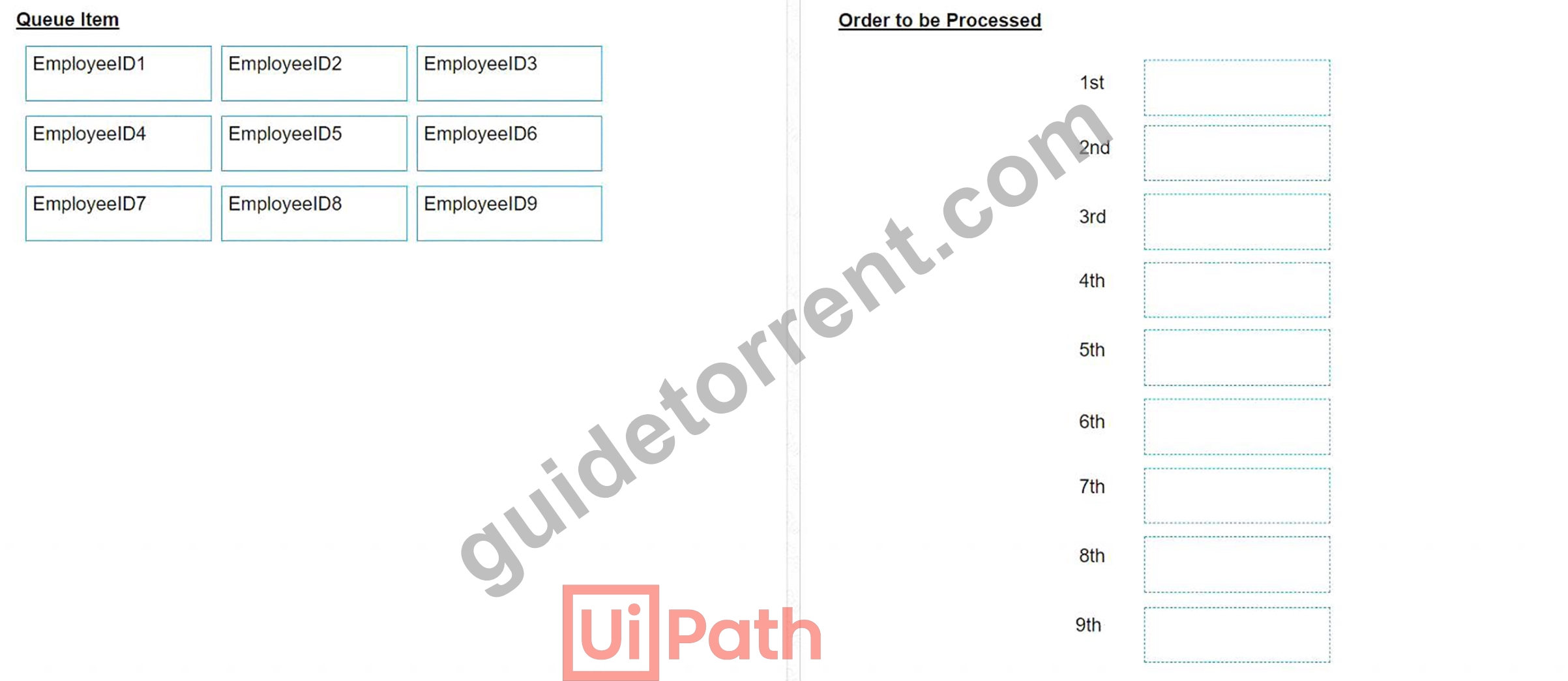
Answer:
Explanation: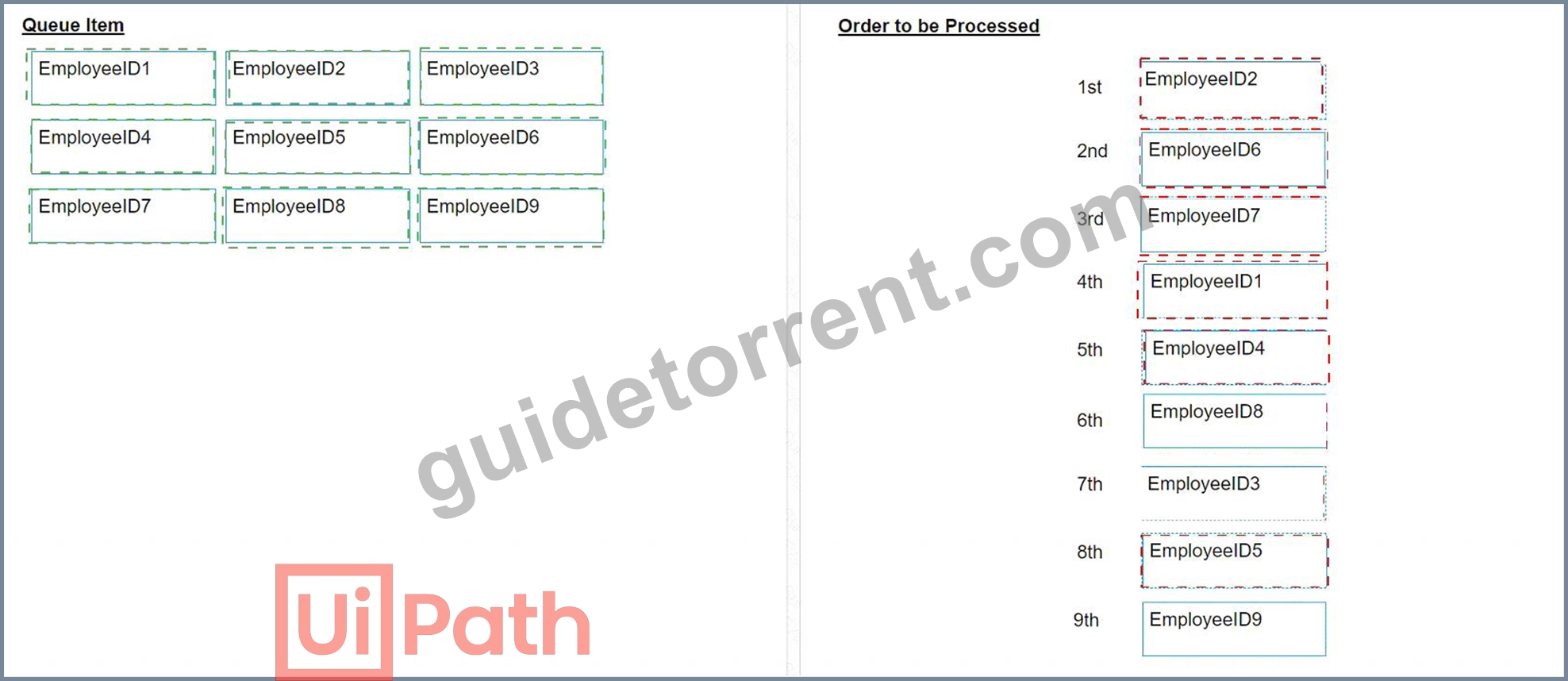
NEW QUESTION # 127
In the context of the REFramework, if the OrchestratorQueueName key is present in both the Settings and Assets sheets, but an asset with the corresponding name is not present in Orchestrator, what will be the behavior at run time?
- A. An empty string will be saved for the "OrchestratorQueueName" key in the config dictionary.
- B. The "OrchestratorQueueName" key is not added to the config dictionary and the flow will throw in Get Transaction Data workflow.
- C. The flow will throw an exception in InitAllSettings workflow.
- D. The flow will use the value from the Settings sheets since the asset is missing.
Answer: C
Explanation:
In the Robotic Enterprise Framework (REFramework) for UiPath, the OrchestratorQueueName key is used to specify the name of the queue from which the robot will process transactions. If the OrchestratorQueueName key is specified in both the Settings sheet and the Assets sheet of the configuration, the REFramework will first attempt to get the value from the Orchestrator asset.
If the asset with the corresponding name to OrchestratorQueueName is not found in Orchestrator, the behavior at runtime would depend on how the REFramework's InitAllSettings.xaml is implemented. Generally, if an asset is expected but not found in the Orchestrator, an exception is thrown because the asset is typically considered a required component for the process to run correctly.
Therefore, the most likely behavior at runtime would be:
B: The flow will throw an exception in the InitAllSettings workflow.
This would occur because the InitAllSettings workflow contains the logic to load configuration settings and assets, and if an expected asset is not found, an exception is usually thrown to prevent the process from continuing without required configuration.
NEW QUESTION # 128
Given the following workflow: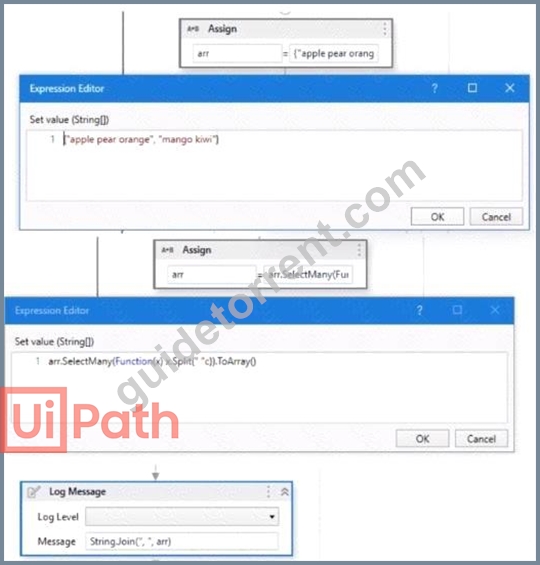
What will be the output of the Log Message activity?
- A. apple, pear, orange
- B. "apple pear orange", "mango kiwi"
- C. apple, pear, orange, mango, kiwi
- D. apple pear orange, mango kiwi
Answer: C
NEW QUESTION # 129
......
New UiPath-ADPv1 Exam Dumps with High Passing Rate: https://www.guidetorrent.com/UiPath-ADPv1-pdf-free-download.html
UiPath UiPath-ADPv1 Actual Questions and Braindumps: https://drive.google.com/open?id=1JXomKEIB5PG3oIUgTwX7isBEnh8uNdo1