


Candidates remember service as much as content. GuideTorrent builds both into the AD0-E720 package: 52 practice questions across three formats, plus pre-sale and after-sale support designed so customers genuinely get what they should.
Adobe AD0-E720 Exam Overview:
| Certification Vendor: | Adobe |
|---|---|
| Exam Name: | Adobe Commerce Front-End Developer Expert |
| Exam Number: | AD0-E720 |
| Exam Format: | Multiple-choice, Multiple-select |
| Exam Duration: | 90-100 |
| Related Certifications: | Adobe Commerce Front-End Developer Professional (AD0-E721) |
| Certificate Validity Period: | 2 years |
| Real Exam Qty: | 50-60 |
| Available Languages: | English |
| Exam Price: | $225 USD (Global), $150 USD (India) |
| Passing Score: | 550/1000 or 55% |
| Recommended Training: | Adobe Official Preparation Resources Adobe Commerce Developer Documentation |
| Exam Registration: | Adobe Certification Portal |
| Sample Questions: |  |
| Exam Way: | Online proctored (remote, monitored via camera/microphone) or onsite at authorized test centers |
| Pre Condition: | Recommended 1-3 years of hands-on experience in Adobe Commerce/Magento front-end development; no mandatory prerequisite exam |
| Official Syllabus URL: | https://certification.adobe.com/certifications |
Adobe AD0-E720 Exam Syllabus Topics:
| Section | Weight | Objectives |
|---|---|---|
| Topic 1: Layout XML & Templates | 22% | - Template security and output escaping - Pass arguments to phtml templates - Layout XML instructions and hierarchy - Template creation and customization - Create custom page layouts - Extend, merge, and override XML |
| Topic 2: Page Builder & Customization | 12% | - Extend Page Builder components - Customize Page Builder content types - Frontend rendering and styling - Integration with existing themes |
| Topic 3: JavaScript & UI Components | 24% | - Component interactions and data flow - Mage widgets and jQuery integration - Initialize JS via Layout XML - JS translation implementation - KnockoutJS and UI components - RequireJS usage and configuration |
| Topic 4: Theme Management | 16% | - Design exceptions and theme properties - Create and extend themes - Theme folder structure and inheritance - Customize transactional emails - Implement translations - File placement: app/code vs app/design |
| Topic 5: Tools & Optimization | 8% | - CLI commands and deploy modes - Grunt workflow for frontend - Performance optimization best practices |
| Topic 6: Styles & LESS | 18% | - Purpose of styles-m.less, styles-l.less, print.less - LESS structure and hierarchy - Override and extend LESS components - Client-side vs server-side compilation - Style transactional emails - Implement mixins and variables |
AD0-E720 Exam FAQ
Registration for the Adobe Commerce Front-End Developer Expert exam costs $225 USD (Global), $150 USD (India), and passing requires 550/1000 or 55%. Retakes cost the full fee again, so gauge your readiness with the GuideTorrent practice engines before booking your seat.
The written refund policy applies. Take the Adobe Commerce Front-End Developer Expert exam within 60 days of purchase, and if you do not pass, GuideTorrent refunds you in full. The policy does not apply if the exam is taken within 3 days of purchase, if the exam was never actually taken, or to free materials or expired orders, and the candidate name must match the payer name. Submit a scan of your enrollment slip and the official Score Report PDF within 2 days of the exam; claims are processed within 7 days. Alternatively, exchange for two free exam products of equal value and keep your original update service. Orders arrive by email within 1 minute — contact support if nothing arrives within 2 hours.
Online proctored (remote, monitored via camera/microphone) or onsite at authorized test centers Registration for the Adobe Commerce Front-End Developer Expert exam is handled through these official channels:
After booking, your GuideTorrent practice questions arrive by email within 1 minute — preparation can begin the same day.
The AD0-E720 exam is a Adobe certification exam validating the skills in the Adobe Commerce Front-End Developer Expert syllabus shown above. It counts toward these credential paths: Adobe Commerce Front-End Developer Professional (AD0-E721). Candidates at many career stages take it in 2026 to demonstrate verified capability. GuideTorrent prepares you with 52 practice questions in PDF, Desktop Test Engine, and Online Test Engine formats.
Everything, in one purchase: 52 practice questions for the Adobe Commerce Front-End Developer Expert exam in three formats — a printable, expert-prepared PDF with instant download; a Desktop Test Engine for Windows that simulates the real exam with two practice modes and works offline; and an Online Test Engine for any browser on Windows, Mac, Android, and iOS with test history and performance review. You also receive a free demo, 365 days of free updates from a team that keeps innovating on the material, a 50% renewal discount afterward, unlimited installations, and considerate pre-sale and after-sale service.
The Adobe Commerce Front-End Developer Expert exam contains 50-60 with 90-100 to complete them. Practicing under the same time constraint with the GuideTorrent Desktop Test Engine makes exam-day pacing feel rehearsed.
Recommended 1-3 years of hands-on experience in Adobe Commerce/Magento front-end development; no mandatory prerequisite exam Since policies evolve, confirm the current requirements on the official Adobe exam page before you schedule.
Adobe recommends the following training for the Adobe Commerce Front-End Developer Expert exam:
Supplement the training with the 52 practice questions from GuideTorrent — self-testing reveals what training alone cannot.
The official Adobe Commerce Front-End Developer Expert outline defines 6 domains, the three largest being JavaScript & UI Components (24%), Layout XML & Templates (22%), and Tools & Optimization (8%). The complete list is in the topics section above, and GuideTorrent's 52 practice questions address every domain.
Adobe Commerce Front-End Developer Expert Sample Questions:
An Adobe Commerce developer needs to add CMS content above products on a specific category page via the Admin Panel. Where would the developer need to put the content in order to use Display Modes functionality and display it on the category?
- A. CMS Page
- B. CMS Block
- C. Widget
Correct Answer: B 🗳️
Explanation: Only visible for GuideTorrent members. You can sign-up / login (it's free).
An Adobe Commerce developer wants to create a sticky widget.
How would the widget be initialized using the data-mage-init attribute?
- A.

- B.

- C.

Correct Answer: B 🗳️
Explanation: Only visible for GuideTorrent members. You can sign-up / login (it's free).
An Adobe Commerce developer wants to add a custom widget that extends the default Calendar Widget. What would the contents of this file look like?
- A.

- B.
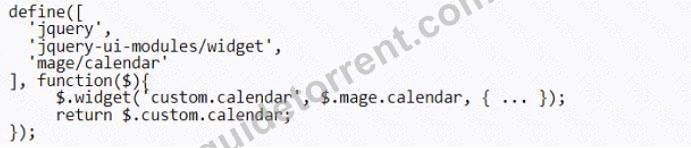
- C.

Correct Answer: B 🗳️
Explanation: Only visible for GuideTorrent members. You can sign-up / login (it's free).
An Adobe commerce developer wants to initialize a JavaScript component using a data attribute. Which option would initialize the JavaScript component?
- A. <nav data-bind='{"<component_name>": {...}}'></nav>
- B. <nav data-init='{"<component_name>": {...}}'></nav>
- C. <nav data-mage-init='{"<component_name>": {...}}'></nav>
Correct Answer: C 🗳️
Explanation: Only visible for GuideTorrent members. You can sign-up / login (it's free).
An Adobe Commerce developer has created a system configuration field:
Using Layout XML, how can the visibility of a block be controlled by a system configuration?
- A. <block name="block.name" template="Vendor_Module::template.phtml"
ifconfig="general/module/enable" /> - B. <block name="block.name" template="Vendor_Module::template.phtml="
ifconfig="vendor/general/enable" /> - C. <block name="block.name" template=''Vendor_Module:
:template.phtml"ifconfig="module/general/enable" />
Correct Answer: B 🗳️
Explanation: Only visible for GuideTorrent members. You can sign-up / login (it's free).
Viewing page 1 out of 11 pages.
Viewing questions 1-5 out of 52 questions.


